

Microsoft users across the U.S. experienced widespread disruptions Thursday after a technical failure prevented people from sending or receiving email through Outlook, a core service within Microsoft 365.
The outage occurred during U.S. business hours and quickly affected schools, government offices, and companies that rely on Outlook for daily operations. Microsoft confirmed the issue publicly and said it was working to restore service. There is no indication the disruption was caused by a cyberattack, according to company statements.
Still, McAfee warns in these situations to be wary of phishing attempts as scammers latch onto these outages to take advantage of innocent users.
“Outages like this create uncertainty, and scammers move fast to take advantage of it,” said Steve Grobman, McAfee’s Chief Technology Officer. “When people can’t get into email or the tools they use every day, it’s easy to assume something is wrong with your account — and that’s exactly the moment attackers look for.”
“Fake alerts start circulating that look like they’re coming from the real company, with logos and urgent language telling you to reset a password or verify your information,” Grobman added. “Some push fake support numbers or messages claiming they can restore access. If you’re impacted, slow down, go straight to the official source for updates, and don’t share passwords, verification codes, or payment details in response to an unexpected message.”
“Tools that can spot suspicious links and fake login pages help reduce risk — especially when people are trying to get back online quickly,” Grobman said.
Here, we break down what happened and why outages are prime time for scammers.
What happened to Microsoft Outlook?
A Microsoft infrastructure failure disrupted email delivery.
Microsoft said the outage was caused by a portion of its North American service infrastructure that was failing to properly handle traffic. Users attempting to send or receive email encountered a “451 4.3.2 temporary server issue” error message.
Microsoft also warned that related services, including OneDrive search and SharePoint Online, could experience slowdowns or intermittent failures during the incident.
When did the Microsoft outage happen?
The disruption unfolded over several hours on Thursday afternoon (ET).
Based on timelines reported by CNBC and live coverage from Tom’s Guide, the outage progressed as follows:
Around 2:00 p.m. ET: User reports spike across Microsoft services, especially Outlook, according to Down Detector data cited by Tom’s Guide.
2:37 p.m. ET: Microsoft confirms it is investigating an Outlook email issue, per CNBC.
3:17 p.m. ET: Microsoft says it identified misrouted traffic tied to infrastructure problems in North America, CNBC reports.
4:14 p.m. ET: The company announces affected infrastructure has been restored and traffic is being redirected to recover service.
Tom’s Guide reported that while outage reports declined after Microsoft’s fix, some users continued to experience intermittent access issues as systems rebalanced.
Was this a hack or cyberattack?
No. Microsoft says the outage was caused by technical infrastructure issues.
According to CNBC, Microsoft has not indicated that the outage was the result of hacking, ransomware, or any external attack. Instead, the company attributed the disruption to internal infrastructure handling errors, similar to a previous Outlook outage last July that lasted more than 21 hours.
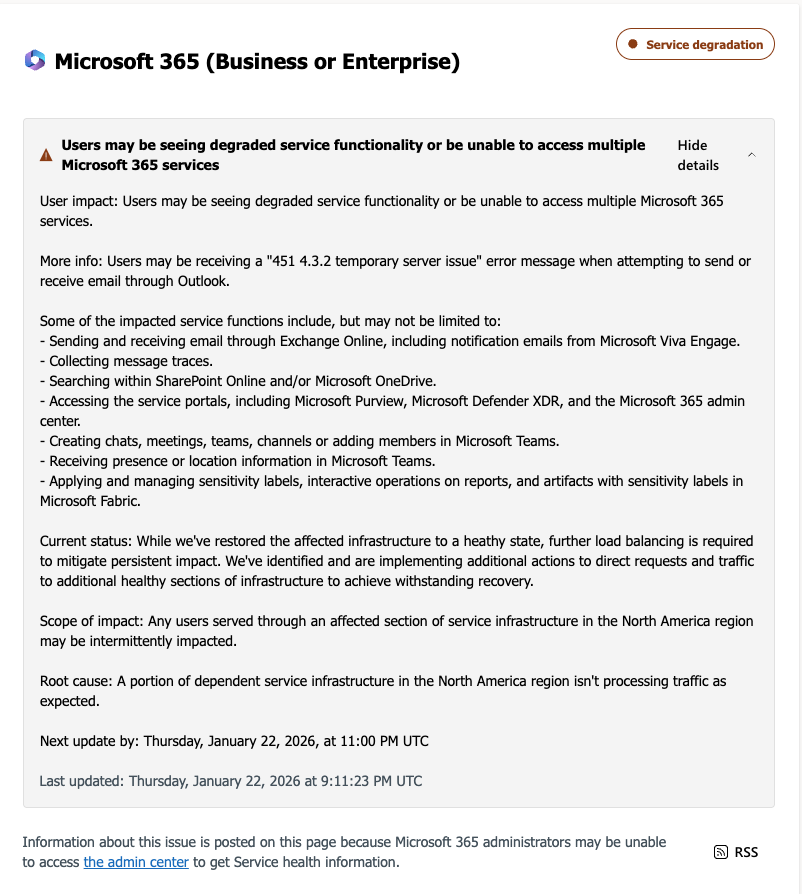
A message sent by Microsoft about the server issue.
Why outages cause widespread disruption
Modern work depends on shared cloud infrastructure.
That sudden loss of access often leaves users unsure whether:
- Their account has been compromised
- Their data is at risk
- They need to take immediate action
That uncertainty is exactly what scammers look for.
How scammers exploit big tech outages
They impersonate the company and trick users into signing in again.
After major outages involving Microsoft, Google, or Amazon Web Services, security researchers, including McAfee, have observed scam campaigns emerge within hours.
These scams typically work by:
Impersonating Microsoft using logos, branding, and language copied from real outage notices
Sending fake “service restoration” emails or texts claiming users must re-authenticate
Linking to realistic login pages designed to steal Microsoft usernames and passwords
Posing as IT support or Microsoft support and directing users to fake phone numbers
Once credentials are stolen, attackers can access email accounts, reset passwords on other services, or launch further phishing attacks from a trusted address.
How to stay safe during a Microsoft outage
Outages are confusing. Scammers rely on urgency and familiarity.
To reduce risk:
- Do not click links in emails or texts about outages or “account recovery.”
- Go directly to official sources, such as Microsoft’s status page or verified social accounts.
- Never re-enter your password through links sent during an outage.
- Ignore urgent fixes that ask for downloads, payments, or credentials.
If you already clicked or entered information:
- Change your Microsoft password immediately
- Update passwords anywhere you reused it
- Turn on or refresh two-factor authentication
- Review recent account activity
- Run a trusted security scan to remove malicious software (check out our free trial)
How McAfee can help
Using advanced artificial intelligence, McAfee’s built-in Scam Detector automatically detects scams across text, email, and video, blocks dangerous links, and identifies deepfakes, helping stop harm before it happens.
McAfee’s identity protection tools also monitor for signs your personal information may be exposed and guide you through recovery if scammers gain access.
FAQ
| Q: Is Microsoft Outlook still down? A: Microsoft said Thursday afternoon that it had restored affected infrastructure and was redirecting traffic to recover service, according to CNBC. Some users may still experience intermittent issues. |
| Q: Was the Microsoft outage caused by hackers? A: No. Microsoft has not reported any cyberattack or data breach related to the outage, per CNBC. |
| Q: Can scammers really use outages to steal accounts? A: Yes. During major outages, scammers often impersonate companies like Microsoft and trick users into signing in again on fake websites. |
| Q: Should I reset my password after an outage? A: Only if you clicked a suspicious link or entered your credentials somewhere outside Microsoft’s official site. Otherwise, resetting passwords isn’t necessary. |

Stay Updated
Follow us to stay updated on all things McAfee and on top of the latest consumer and mobile security threats.